 Blackboard
Note: To replace a file in Canvas, the file you are uploading must have the same name as the file it is replacing.
- Click on Files on the Course Navigation menu.
Note: If you don’t see the file you want to replace after clicking on Files, go into Uploaded Media folder. You should find it there. - Click on Upload.

- Browse for the updated file that you want to upload and click Open to choose that file.
- Canvas will display a popup stating that the file already exists. Click the Replace button to overwrite the file.
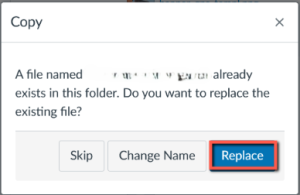
Note: If you don’t see this popup, that means that the file name isn’t the same as the file you’re replacing.