 Blackboard
There are two navigation menus in Canvas - Global Navigation and Course Navigation.
Global Navigation is the menu on the far left of the page and it allows you to quickly access to frequently used features such as the Dashboard, Courses, Account, and Inbox.

The Course Navigation menu helps you and your students access different areas within the course.
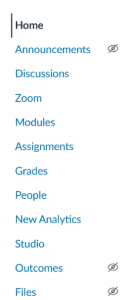
The GPS course template has been set up with the following menu items:
- Announcements
- Discussions
- Zoom
- Modules
- Assignments
- Grades
- People
- New Analytics
- Studio
- Settings
In general, we ask that the GPS course menu be kept in this order for consistency, which is one aspect of accessibility. However, we recognize that sometimes faculty need to change them or make them unavailable for a variety of reasons.
If you need to make a tool unavailable or reorder them, you can do so by clicking on Settings and then clicking on the Navigation tab.